A few years ago, getting good results from a large language model (LLM) mostly meant writing a better prompt. You rephrased the question, added an example or two, told the model what role to play, and tried again. That skill, prompt engineering, is still useful. But the systems developers build in 2026 look very different from a single chat box. Today's AI agents read files, call APIs, search documents, remember earlier sessions and run for dozens of steps before they finish a task.
In that world, the wording of one prompt is only a small part of what decides success. What matters more is everything the model can see at the moment it makes a decision: instructions, retrieved documents, previous messages, tool results, notes and the current state of the task. Designing and managing that information is called context engineering.
This guide explains context engineering vs prompt engineering in plain language. You will learn what each term means, how they relate (spoiler: they are not rivals), how context engineering works inside AI agents and coding assistants, and how to apply it with four runnable Python examples.
What Is Prompt Engineering?
Definition
Prompt engineering is the practice of writing and organising the instructions you give an LLM so it produces the output you want. Anthropic describes it as methods for writing and organising LLM instructions for optimal outcomes, with a particular focus on system prompts. OpenAI's prompt engineering guidance has long organised the craft around a few durable strategies: write clear instructions, provide reference text, split complex tasks into simpler subtasks, give the model time to think, use external tools and test changes systematically.
How Prompt Engineering Works
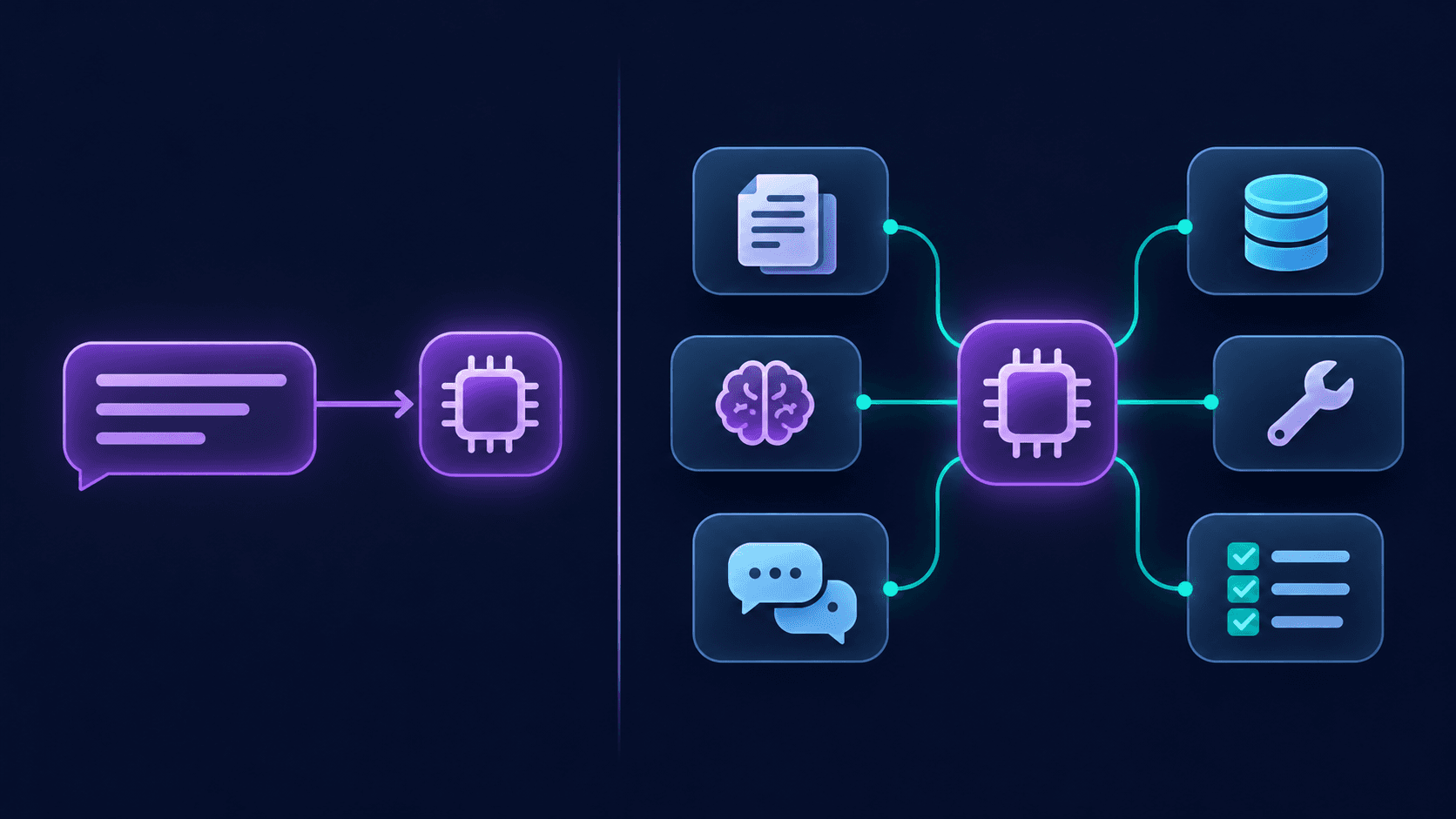
The model receives your text, processes it in one inference call and returns a response. Everything the model needs has to be inside that prompt, so the prompt author's job is to remove ambiguity: say who the model is acting as, what the task is, what rules apply and what the answer should look like.

Figure 1: In prompt engineering, quality comes from the design of a single input.
Structure of a Good Prompt
- Role: who the model should act as ("You are a billing support assistant").
- Task: the specific job ("Classify this review's sentiment").
- Constraints: rules and limits ("Answer in one word", "Do not guess prices").
- Output format: plain text, a bulleted list, JSON with named fields, and so on.
- Examples (few-shot): one to a few input–output pairs that show the expected behaviour.
- Input data: the actual text to work on, clearly separated from instructions (for example inside XML-style tags or triple quotes).
A Practical Example
Compare a vague prompt with an engineered one:
Vague:      "Summarise this email."

Engineered: "You are an assistant for a busy project manager.
Summarise the email below in at most 3 bullet points.
Start with any deadline or action item. If there is none, write 'No action needed'.
<email> ... </email>"
The second version tells the model the audience, the length, the priority order and how to handle an edge case. That is prompt engineering in one sentence: making the model's job unambiguous.
Benefits and Limitations
Benefits: it is fast to learn, needs no infrastructure, works with any model and often produces large quality gains for single tasks such as classification, extraction, drafting and summarisation.
Limitations: a prompt is static. It cannot fetch today's order status, remember what a user said last week or decide which of 40 tools to call. Long prompts also cost more tokens on every call. Once your application needs live data, memory or multiple steps, a better prompt alone stops being enough.
What Is Context Engineering?
Definition
Context engineering is the practice of deciding what information goes into the model's context window, in what form and at which moment. Anthropic's engineering team frames it as the set of strategies for curating and maintaining the best set of tokens during inference, including all information outside the prompt itself, and calls it the natural progression of prompt engineering. LangChain describes it as filling the context window with just the right information for each step of an agent's trajectory, a framing popularised by Andrej Karpathy in 2025. IBM similarly defines it as deliberately designing, structuring and optimising the context given to an LLM to make outputs more accurate and reliable.
The definitions differ in wording, but they agree on the core idea: the model only knows what is in its context window right now, so the system around the model must carefully choose what goes in.
How Context Engineering Works
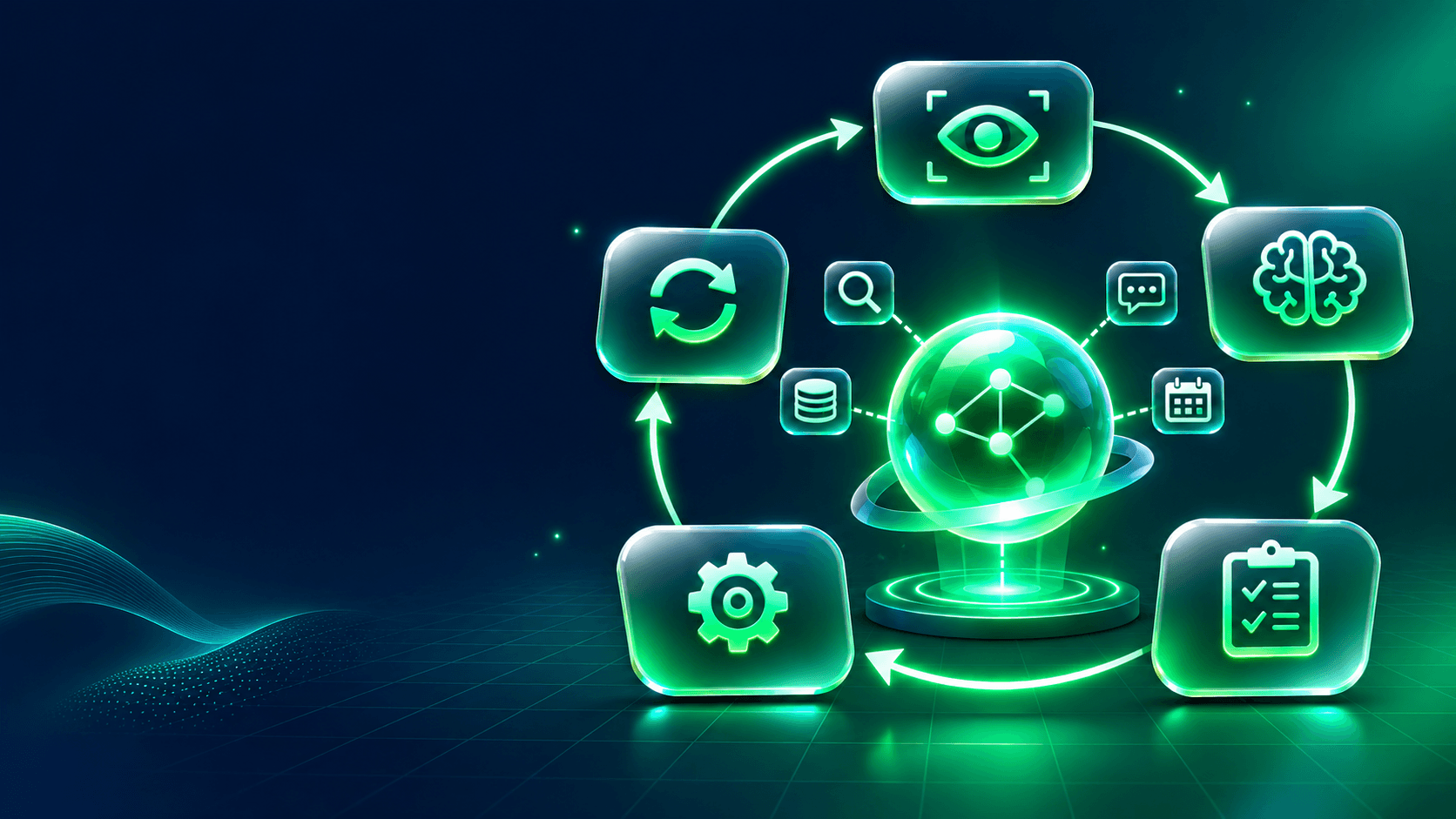
Before every model call, the application runs a small pipeline. It looks at the current task, gathers candidate information from several sources, keeps only what is relevant, compresses what is too long, orders the pieces sensibly and sends the result to the model. After the model responds (or calls a tool), the system updates its memory and state, and the cycle starts again for the next step.
Components of Context
In a typical agent, the context window may contain system instructions, the user's message, recent conversation history, facts from long-term memory, documents retrieved from a knowledge base, tool definitions, tool results and a summary of task progress. Each is covered in detail below.

Figure 2: Context engineering assembles many sources into one curated context for each model call.
Context Assembly
Assembly is where the pieces become a single input. Good assembly uses clear sections (for example <instructions>, <documents>, <task> tags or Markdown headings), puts stable instructions first and places the most important, task-specific content where the model is least likely to overlook it. Placement matters: the "Lost in the Middle" study (Liu et al., 2023) found that models often use information at the start or end of a long input better than information buried in the middle.
Dynamic Context Management
The defining feature of context engineering is that it is dynamic. Writing a prompt is a one-off task; curating context happens every time the system decides what to pass to the model. In a 20-step agent run, the context is rebuilt 20 times, and each version should contain what that step needs and little else.
Context Engineering vs Prompt Engineering: Key Differences
When people compare prompt engineering vs context engineering, the short answer is this: prompt engineering designs the instructions; context engineering designs the entire information environment around those instructions. Prompt engineering is a subset of context engineering, not a competitor. IBM's explainer makes the same point, describing prompt engineering as part of context engineering but narrower in scope. The comparison below shows how they differ across ten dimensions.

Figure 3: Context engineering vs prompt engineering at a glance.
The same comparison in text form:
- Meaning: prompt engineering is writing effective instructions; context engineering is curating all the tokens the model sees.
- Scope: the prompt text vs prompts plus data, memory, tools and state.
- Inputs: role, task, rules and examples vs those plus history, retrieved documents and tool results.
- Techniques: few-shot examples, structure and formatting vs retrieval, ranking, summarisation (compaction) and context isolation.
- Memory: none beyond the prompt vs managed short-term and long-term memory.
- External knowledge: pasted in by hand vs retrieved on demand through RAG or search.
- Tool integration: tools are described in text vs tools are selected, executed and their outputs trimmed.
- Use cases: single tasks, content generation and classification vs agents, copilots and long-running workflows.
- Complexity: low to medium vs medium to high, because it is a system-design problem.
- Role in AI agents: prompt engineering writes the agent's instructions; context engineering runs the agent's whole information flow.

Figure 4: Prompt engineering is one part of context engineering.
Core Components of Context Engineering
1. System Instructions
The system prompt sets the agent's role, goals, rules and output style. Anthropic recommends writing it at the "right altitude": specific enough to guide behaviour, but not so rigid that it becomes a brittle list of if-else rules. Organise it into clear sections such as background, instructions, tool guidance and output format, and keep it as short as the task allows.
2. External Knowledge and RAG
Retrieval-Augmented Generation (RAG) fetches relevant passages from your own data (docs, tickets, product catalogues) and adds them to the context so the model can answer from facts it was never trained on. A typical pipeline splits documents into chunks, converts them to vector embeddings, stores them in a vector database and, at query time, retrieves the closest chunks. RAG is one of the most important context sources, but it is not the whole of context engineering: it does not decide how history is trimmed, how tools are presented or what the agent remembers.
3. Conversation History
Previous user and assistant turns give the model continuity. But history grows with every message. Practical strategies include keeping the last few turns verbatim, summarising older turns and dropping small talk that no longer matters.
4. Memory (Short-Term and Long-Term)
Short-term memory is what the agent holds during one task or session: the current conversation, a scratchpad and intermediate results. Long-term memory persists across sessions: user preferences, project facts or lessons learned, usually stored in a database or files and loaded only when relevant. Writing notes outside the context window and reading them back later lets an agent work far beyond a single window's size.
5. Tools and MCP
Tools let a model act and fetch fresh context: query a database, search the web, read a file or create a ticket. Each tool definition (name, description and parameters) itself consumes context, so a smaller set of clearly distinct tools is easier for the model to use correctly than a large overlapping one.
The Model Context Protocol (MCP), an open standard introduced by Anthropic in November 2024, standardises how applications connect models to external tools and data. An MCP host (such as an IDE or chat app) runs MCP clients that talk to MCP servers over JSON-RPC 2.0. Servers can expose tools (actions), resources (data) and prompts (templates). MCP solves the plumbing (how context is reached); it deliberately does not decide which context your application should use. That decision is still context engineering.
6. Task State
Task state is a compact record of progress: the goal, steps completed, key findings and what remains. Without it, a multi-step agent repeats work, forgets earlier results or loses track of the goal. A to-do list or a small progress file is often enough.
7. Context Selection and Compression
LangChain groups agent context strategies into four buckets that are a useful mental model:
- Write: save information outside the window (scratchpads, memory files) so it is not lost.
- Select: pull only relevant information into the window (retrieval, memory lookup, tool selection).
- Compress: keep only the tokens the task needs (summaries, trimming old tool outputs).
- Isolate: split context across sub-agents or separate state so each works with a focused window.
Isolation is also how multi-agent context sharing works in practice: a lead agent hands a sub-agent a focused brief, the sub-agent explores in its own context window, and only a short summary returns to the lead agent. Anthropic describes this pattern in its multi-agent research system.
How Context Engineering Works in AI Agents
Anthropic offers a simple working definition of an agent: an LLM autonomously using tools in a loop. Context engineering governs what the model sees on every pass through that loop:
- User request: the user states a goal ("Where is my order and can I return it?").
- Task analysis: the system (or the model) identifies what information and actions the goal needs.
- Context retrieval: relevant documents and records are fetched, for example the returns policy.
- Memory selection: useful facts are loaded from memory, such as the customer's plan or past issues.
- Tool selection: only tools relevant to this task are exposed (order lookup, not invoice editing).
- Context assembly: instructions, data, memory, tool definitions and task state are ordered into one input within the token budget.
- LLM execution: the model reasons and either answers or requests a tool call.
- Tool execution: the application runs the tool and captures the result.
- Response: once enough information is gathered, the model produces the final answer.
- Context update: results are condensed into task state and memory; stale tool output is cleared so the next step starts clean.

Figure 5: The context lifecycle repeats on every agent step.
Why Context Window Limits Matter
Modern models accept very long inputs, but more is not automatically better. Chroma's 2025 "Context Rot" report tested 18 models and found that performance became less reliable as input length grew, even on simple tasks, with distracting content making it worse. Combined with the "lost in the middle" effect, this means long contexts cost more and can reduce accuracy. Anthropic's guidance summarises the goal well: find the smallest set of high-signal tokens that makes the desired outcome most likely.
Model providers now offer built-in help. For example, Anthropic announced context editing (automatically clearing stale tool results) and a file-based memory tool for the Claude Developer Platform in 2025, reporting in its own internal agentic-search evaluation that the two together improved performance by 39% over baseline. Treat vendor figures like this as evidence for the approach on that benchmark, not a guarantee for your workload.
Practical Python Examples
The four examples below run with plain Python 3.10+ and no API key. Where a real LLM or embedding model would be called, a small stand-in function is used and clearly labelled, so you can focus on how the context is built. To use a real model, replace the stand-in with your provider's SDK call.
A. Basic Prompt Engineering
This example packs role, rules, output format and one example into a single system prompt. All the "intelligence" lives in the wording.
"""Example A: basic prompt engineering.

A single, well-structured prompt: role, task, constraints, output format
and one example. `call_llm` is a stand-in so the script runs offline.
"""


def build_prompt(review: str) -> list[dict]:
    system = (
        "You are a customer-feedback analyst for an e-commerce company.\n"
        "Classify the sentiment of a product review.\n"
        "Rules:\n"
        "- Answer with exactly one word: positive, negative or mixed.\n"
        "- If the review mentions both praise and a complaint, answer mixed.\n"
        "Example:\n"
        'Review: "Fast delivery but the charger stopped working." -> mixed'
    )
    return [
        {"role": "system", "content": system},
        {"role": "user", "content": f'Review: "{review}"'},
    ]


def call_llm(messages: list[dict]) -> str:
    # Replace with a real SDK call, for example:
    # client.chat.completions.create(model=..., messages=messages)
    text = messages[-1]["content"].lower()
    praise = any(w in text for w in ("great", "love", "fast", "excellent"))
    complaint = any(w in text for w in ("broke", "late", "bad", "stopped"))
    if praise and complaint:
        return "mixed"
    return "negative" if complaint else "positive"


if __name__ == "__main__":
    for review in ["Great battery life, love it!", "Arrived late and the strap broke.",
                   "Excellent screen, but the box was bad."]:
        print(review, "->", call_llm(build_prompt(review)))
What to notice: build_prompt separates instructions (system message) from data (user message), constrains the output to one word and includes a worked example of the tricky "mixed" case. Output: positive, negative and mixed for the three sample reviews.
B. Context Engineering with Structured Context
Here the prompt is only one block among several. A ContextBuilder ranks blocks by priority, enforces a token budget and orders the final context so stable instructions come first and the live question comes last.
"""Example B: context engineering with structured context.

Each piece of context is a labelled block with a priority. The builder
keeps the highest-priority blocks that fit a token budget and orders them
so stable instructions come first and the live question comes last.
Token counts use a rough 4-characters-per-token estimate (illustrative).
"""
from dataclasses import dataclass


@dataclass
class ContextBlock:
    name: str
    content: str
    priority: int  # lower number = more important

    @property
    def tokens(self) -> int:
        return max(1, len(self.content) // 4)


class ContextBuilder:
    ORDER = ["system", "user_profile", "memory", "documents", "history", "task"]

    def __init__(self, budget_tokens: int):
        self.budget = budget_tokens
        self.blocks: list[ContextBlock] = []

    def add(self, name: str, content: str, priority: int) -> None:
        if content.strip():
            self.blocks.append(ContextBlock(name, content.strip(), priority))

    def build(self) -> str:
        chosen, used = [], 0
        for block in sorted(self.blocks, key=lambda b: b.priority):
            if used + block.tokens <= self.budget:
                chosen.append(block)
                used += block.tokens
            else:
                print(f"[skipped] {block.name} ({block.tokens} tokens) - over budget")
        chosen.sort(key=lambda b: self.ORDER.index(b.name))
        parts = [f"<{b.name}>\n{b.content}\n</{b.name}>" for b in chosen]
        print(f"[context] {used}/{self.budget} tokens used")
        return "\n\n".join(parts)


if __name__ == "__main__":
    builder = ContextBuilder(budget_tokens=120)
    builder.add("system", "You are a support assistant for Acme Cloud. Cite the document you used.", 0)
    builder.add("task", "User question: Why was my invoice higher this month?", 0)
    builder.add("user_profile", "Plan: Pro (monthly). Region: India. Currency: INR.", 1)
    builder.add("documents", "Billing FAQ: usage above the plan quota is billed per GB at month end.", 2)
    builder.add("memory", "Last month the user asked about storage quota alerts.", 3)
    builder.add("history", "Earlier small talk about the dashboard theme. " * 12, 5)
    print(builder.build())
What to notice: the long, low-priority small-talk history is skipped because it would exceed the 120-token budget, while the billing FAQ and user profile make it in. The token count uses a rough four-characters-per-token estimate for illustration; in production, use your model provider's tokenizer or token-counting endpoint.
C. A Simple RAG-Style Retrieval Workflow
Simplified for learning: instead of a real embedding model and vector database, this example uses word-count vectors and cosine similarity. The workflow (index, retrieve top-k, filter by score, build a grounded prompt) is the same one you would use with real embeddings.
"""Example C: a simple RAG-style retrieval workflow.

SIMPLIFIED FOR LEARNING: word-count vectors and cosine similarity stand in
for a real embedding model and vector database. The flow is the same:
chunk -> index -> retrieve top-k -> assemble a grounded prompt.
"""
import math
import re
from collections import Counter

DOCS = {
    "refund-policy.md": "Refunds are available within 30 days of purchase. "
                        "Digital courses are refundable if less than 20 percent is watched.",
    "shipping.md": "Orders ship within 2 business days. Delivery in India takes 3 to 7 days.",
    "account.md": "You can reset your password from the login page using your registered email.",
}


STOPWORDS = {"a", "an", "the", "i", "can", "for", "of", "is", "are", "to", "in", "if", "you", "your", "my", "get", "from", "using"}


def tokenize(text: str) -> list[str]:
    words = re.findall(r"[a-z0-9]+", text.lower())
    # crude normalisation: drop stopwords and a trailing plural "s"
    return [w[:-1] if w.endswith("s") and len(w) > 3 else w for w in words if w not in STOPWORDS]


def vectorize(text: str) -> Counter:
    return Counter(tokenize(text))


def cosine(a: Counter, b: Counter) -> float:
    dot = sum(a[t] * b[t] for t in a)
    norm = math.sqrt(sum(v * v for v in a.values())) * math.sqrt(sum(v * v for v in b.values()))
    return dot / norm if norm else 0.0


INDEX = [(name, text, vectorize(text)) for name, text in DOCS.items()]


def retrieve(query: str, k: int = 2, min_score: float = 0.1) -> list[tuple[str, str, float]]:
    q = vectorize(query)
    scored = [(name, text, cosine(q, vec)) for name, text, vec in INDEX]
    scored.sort(key=lambda item: item[2], reverse=True)
    return [item for item in scored[:k] if item[2] >= min_score]


def build_grounded_prompt(query: str) -> str:
    hits = retrieve(query)
    if not hits:
        sources = "No relevant documents found."
    else:
        sources = "\n".join(f"[{name}] (score {score:.2f})\n{text}" for name, text, score in hits)
    return (
        "Answer using only the sources below. If they do not contain the answer, say so.\n\n"
        f"<sources>\n{sources}\n</sources>\n\n<question>{query}</question>"
    )


if __name__ == "__main__":
    print(build_grounded_prompt("Can I get a refund for a course I bought?"))
    print()
    print(build_grounded_prompt("What is your office address?"))
What to notice: the refund question retrieves refund-policy.md, while the office-address question retrieves nothing and the prompt says so explicitly. That min_score threshold and the "if the sources do not contain the answer, say so" instruction are small but important guards against hallucinated answers built on irrelevant chunks.
D. An AI Agent Using Tools and Task State
This example shows the agent loop. plan_next_step is a rule-based stand-in for the model's tool-calling decision; in a real agent, the LLM would receive the compact state and return a tool call.
"""Example D: an agent loop with tools and task state.

`plan_next_step` is a rule-based stand-in for the model's tool-calling
decision so the script runs offline. In a real agent the LLM receives the
compact state below and returns a tool call or a final answer.
"""
from dataclasses import dataclass, field


def get_order_status(order_id: str) -> dict:
    return {"order_id": order_id, "status": "shipped", "carrier": "BlueDart", "eta_days": 2}


def get_refund_policy() -> dict:
    return {"window_days": 30, "condition": "unused items only"}


TOOLS = {"get_order_status": get_order_status, "get_refund_policy": get_refund_policy}


@dataclass
class TaskState:
    goal: str
    steps_done: list[str] = field(default_factory=list)
    facts: dict = field(default_factory=dict)  # compact results, not raw logs
    max_steps: int = 5

    def to_context(self) -> str:
        done = ", ".join(self.steps_done) or "none"
        return f"Goal: {self.goal}\nSteps done: {done}\nKnown facts: {self.facts}"


def plan_next_step(state: TaskState):
    if "order" not in state.facts:
        return ("get_order_status", {"order_id": "A1024"})
    if "refund_policy" not in state.facts:
        return ("get_refund_policy", {})
    return ("final_answer", None)


def run_agent(goal: str) -> str:
    state = TaskState(goal=goal)
    for _ in range(state.max_steps):
        print("--- context sent to model ---\n" + state.to_context())
        tool, args = plan_next_step(state)
        if tool == "final_answer":
            order, policy = state.facts["order"], state.facts["refund_policy"]
            return (f"Order {order['order_id']} is {order['status']} via {order['carrier']} "
                    f"(about {order['eta_days']} days). Refunds: within {policy['window_days']} "
                    f"days, {policy['condition']}.")
        result = TOOLS[tool](**args)
        key = "order" if tool == "get_order_status" else "refund_policy"
        state.facts[key] = result
        state.steps_done.append(tool)
    return "Stopped: step limit reached."


if __name__ == "__main__":
    print(run_agent("Where is order A1024 and can I return it?"))
What to notice: the model never sees raw logs, only TaskState.to_context(): the goal, the steps already done and compact facts. A step limit prevents endless loops. This is context engineering in miniature: write results to state, select what the next step needs and keep the window small.
Context Engineering in Coding Agents
Coding agents such as Claude Code, Cursor or GitHub Copilot's agent mode are among the clearest real-world examples of context engineering, because a codebase is far too large to fit in any context window. (If you are new to the tool, see our guide on how to use Claude Code.)
- CLAUDE.md and project memory: Claude Code loads
CLAUDE.mdfiles as persistent project instructions: build commands, coding conventions and architecture notes. It reads these files from the working directory up the directory tree, and supports importing other files with@pathsyntax, so you can point to existing docs instead of copying them. Keep these files short and specific; every line is loaded into context. - Project documentation: a README, architecture notes and API docs give the agent the "why" behind the code. Link to them rather than pasting them into every session.
- Repository structure: clear folder names and a short map of the repository help the agent find files without reading everything.
- Just-in-time code retrieval: rather than pre-loading the whole repository, agents keep lightweight references such as file paths and use tools like search and file reading to pull in only the files they need. Anthropic describes this "just in time" approach as a deliberate design choice.
- Skills and tools: reusable instruction packs (skills) and tools for tests, linters and git give the agent capabilities that load only when relevant.
- MCP servers: connect the agent to issue trackers, databases or design files so it can fetch the exact ticket or schema it needs.
- Conversation and task memory: to-do lists, progress notes and compaction (summarising a long session) let the agent continue long tasks without losing track.
The practical lesson for developers: the quality of a coding agent's output depends heavily on the project context you give it. A precise CLAUDE.md with the correct test command often saves more time than any clever phrasing in your request.
Real-World Applications
- Customer support agents: combine the customer's profile and history (memory), policy documents (RAG) and order-lookup tools, then summarise each resolved ticket back into memory.
- Coding assistants: combine project instructions, retrieved source files, test output and a task list, as described above.
- Research agents: a lead agent plans, sub-agents search in isolated contexts, and only condensed findings with sources return to the final report.
- Business automation agents: workflows that read emails, update a CRM and send notifications need just the relevant record and rules at each step, not the whole database. Workflow tools such as n8n make these steps visible (see our n8n tutorial for beginners).
- Educational assistants: combine course material (RAG), the learner's progress and weak topics (long-term memory) and the current exercise (task state) to give personalised help.
Popular Tools and Technologies for Context Engineering
None of these is mandatory. Many good systems use only a model API and a few hundred lines of code. Choose tools when they solve a real problem in your project.
- Claude and OpenAI APIs: the foundation. Both support system prompts, tool (function) calling and structured outputs; provider features such as prompt caching and context-management options help with cost and long sessions.
- LangChain: a framework with building blocks for prompts, retrievers, tools and model integrations, useful for wiring components together quickly.
- LangGraph: models an agent as a graph with explicit state, which makes task state, checkpoints, memory and multi-agent setups easier to control. LangChain's own context-engineering notebooks demonstrate write, select, compress and isolate with it.
- LlamaIndex: focused on connecting data to LLMs: document loading, chunking, indexing and retrieval for RAG pipelines.
- Vector databases: options such as pgvector, Chroma, Qdrant, Pinecone, Weaviate or Milvus store embeddings for semantic search. For small datasets, an in-memory index or Postgres with pgvector is often enough.
- MCP: a standard way to expose tools and data to any MCP-compatible client, so you build an integration once and reuse it across agents.
- n8n: a workflow-automation platform with AI agent nodes; a practical way for automation developers to combine LLM calls with business systems without building everything in code.
Common Mistakes and Best Practices
1. Sending Too Much Irrelevant Context
Mistake: dumping whole documents, every tool and the full chat history into each call. Fix: retrieve top-k relevant chunks, expose only task-relevant tools and summarise old history.
2. Ignoring Context-Window Limits
Mistake: assuming "it fits, so it's fine". Fix: set a token budget per section, count tokens with the provider's tokenizer and remember that quality can drop well before the hard limit.
3. Poor Retrieval Quality
Mistake: naive chunking and no relevance threshold, so the model receives near-misses. Fix: chunk by logical sections, combine keyword and semantic (hybrid) search, re-rank results and evaluate retrieval separately from generation.
4. Incorrect Memory Management
Mistake: saving everything forever, or nothing at all. Fix: store durable, verified facts with timestamps, update or delete outdated entries and load memories only when they are relevant to the current task.
5. Missing Task State
Mistake: relying on raw history to track progress in long tasks. Fix: keep an explicit, compact state (goal, done, findings, next) and pass it to the model each step.
6. Unnecessary Tool Usage
Mistake: giving the agent dozens of overlapping tools, which wastes context and confuses selection. Fix: fewer, clearly named tools with distinct purposes and concise outputs; cap the number of agent steps.
7. Failing to Validate Retrieved Information
Mistake: trusting whatever lands in context. Retrieved text can be outdated, wrong or even contain malicious instructions (prompt injection). Fix: prefer trusted sources, show citations, treat retrieved and tool content as data rather than instructions and validate tool outputs before acting on them.
The Future of Context Engineering
It helps to separate what already exists from what is still a prediction.
Established today (2026): agents that use tools in loops; RAG in production; persistent memory features in major AI products and APIs; automatic compaction and context editing in coding agents and developer platforms; MCP as a widely supported integration standard; and multi-agent patterns where sub-agents work in isolated contexts.
Reasonable predictions (not guarantees):
- Context windows will probably keep growing, but curation will stay important because cost, latency and the context-rot effect do not disappear with bigger windows.
- Memory is likely to become more automatic and structured, with agents deciding what to remember and forget, along with better tools for users to inspect and edit those memories.
- Multi-agent systems will likely standardise how agents hand off context to each other.
- Context-aware applications will treat context quality as a measurable engineering metric, with dedicated evaluations for retrieval, memory and state, similar to how we test code today.
Terminology is also still evolving. "Context engineering" became popular during 2025, and some practitioners use related terms such as "agent engineering" or "harness engineering" for overlapping ideas. The underlying skill is the same: deliberately managing what a model sees.
Conclusion
The debate around context engineering vs prompt engineering is less a contest than a change of scope. Prompt engineering teaches you to write clear, testable instructions, and that skill remains essential. Context engineering applies the same discipline to everything else the model sees: retrieved knowledge, memory, tools, history and task state, rebuilt at every step.
A practical way to start: take one AI feature you have built and log exactly what the model receives on each call. Remove what is irrelevant, add what is missing, give it a compact task state and measure the difference. That habit is the heart of context engineering. To see how these ideas fit into autonomous systems, read our guide on what agentic AI is, and if you are planning a career in this space, the forward deployed engineer roadmap covers the skills companies look for.
Frequently Asked Questions
What is the difference between context engineering and prompt engineering?
Prompt engineering is about writing effective instructions for a model. Context engineering is the broader practice of selecting, organising and managing all the information a model receives at each step, including instructions, retrieved documents, memory, tool definitions, tool results and task state.
Is context engineering replacing prompt engineering?
No. Prompt engineering is a part of context engineering. Clear system prompts and tool descriptions are still needed; context engineering adds the dynamic management of everything around them, which becomes essential in multi-step agents.
Is context engineering important for AI agents?
Yes. Agents run many model calls, accumulate tool results and work on long tasks. Without deliberate selection, compression and state tracking, their context fills with noise, costs rise and accuracy tends to drop.
What is the relationship between RAG and context engineering?
RAG is one technique within context engineering. It supplies relevant external knowledge, but context engineering also covers system instructions, history management, memory, tool selection, ordering and compression.
How does MCP help with context engineering?
MCP standardises how AI applications connect to tools, data resources and prompt templates through MCP servers. It makes context easier to reach and reuse across clients, while your application still decides which tools and data to include for each task.
Do developers need Python to learn context engineering?
No. The concepts are language-agnostic. Python has the largest ecosystem of AI libraries, but you can apply context engineering in TypeScript, C#, Java or with low-code tools such as n8n.
Which tools are used for context engineering?
Common choices include model APIs (Claude, OpenAI and others), frameworks such as LangChain, LangGraph and LlamaIndex, vector databases such as pgvector, Chroma, Qdrant or Pinecone, MCP servers and workflow tools such as n8n. None is required; start with the simplest setup that solves your problem.
What is the future of context engineering?
Expect more automatic memory, built-in compaction, standard multi-agent handoffs and better evaluation of context quality. These are informed predictions; the established foundation is that well-curated context remains central to reliable AI systems.
References and Further Reading
- Anthropic: Effective context engineering for AI agents
- Anthropic: Managing context on the Claude Developer Platform
- OpenAI: Prompt engineering guide
- LangChain: Context engineering for agents
- IBM: What is context engineering?
- Model Context Protocol: official documentation
- Claude Code docs: Manage memory (CLAUDE.md)
- Chroma: Context Rot technical report (2025)
- Liu et al.: Lost in the Middle: How Language Models Use Long Contexts